
Docs

Quickstart and per-tool setup

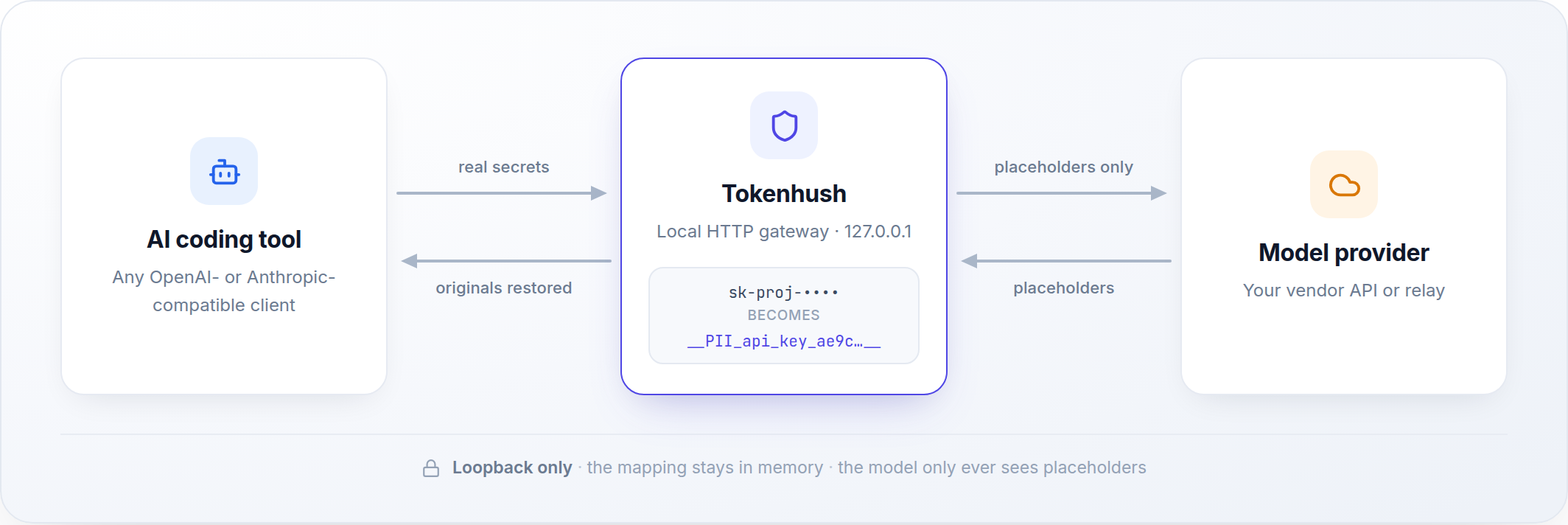
Install the binary, start the local gateway, and point a supported tool at loopback. This page keeps the copy-paste path short; the full configuration reference stays in the public core repository.

Quickstart

Install the binary, start the gateway, then point one tool at loopback. Three copy-paste steps take you from zero to a redacted request.

  1. Install the binary

    One CGO-free binary for macOS, Linux, and Windows on amd64 and arm64.

    macOS

    brew install --cask fregie/tap/tokenhush

    Linux

    curl -fsSL https://raw.githubusercontent.com/fregie/tokenhush/main/install.sh | bash

    Windows

    scoop bucket add fregie https://github.com/fregie/scoop-bucket && scoop install tokenhush
  2. Start the gateway

    The gateway runs in the foreground and listens on 127.0.0.1:8787 by default. It exits on Ctrl-C; V1 ships no built-in service command, so auto-start is your own OS-native wrapper (launchd, a systemd user unit, or Task Scheduler).

    tokenhush run
  3. Point a tool at it

    tokenhush env prints a snippet for the tool you name. The five targets are claude, codex, aider,cline, and roo.

    tokenhush env claude

    Use the printed snippet in the same shell session that launches the tool. Per-tool cards below cover the details, including where the snippet goes.

Per-tool setup

The minimal path for each supported tool. Platform dialects, auth notes, and the fulltokenhush.yaml reference live in the public configuration guide, linked from every card.

Claude Code CLI

Set ANTHROPIC_BASE_URL to the gateway. API-key mode is supported today; the subscription (OAuth) sign-in path is still pending a human test.

eval "$(tokenhush env claude)"

Subscription path pending. Inference requests honorANTHROPIC_BASE_URL, and the subscription (OAuth) sign-in path is still pending a human test. Authorization and token refresh never pass through the gateway.

Codex CLI

Supported in API-key mode through config.toml. ChatGPT subscription login is not supported through the gateway today, so use an API key.

tokenhush env codex

Manual config (~/.codex/config.toml)

model_providers.tokenhush = { name = "Tokenhush", base_url = "http://127.0.0.1:8787/v1" }

Codex uses the Responses API by default; the gateway supports that protocol, including incremental SSE backfill. Use an API key, not a ChatGPT subscription login.

Aider

Point OPENAI_API_BASE or ANTHROPIC_API_BASE at the gateway, or pass the base URL directly on the command line with --openai-api-base.

eval "$(tokenhush env aider)"

The snippet sets the OpenAI and Anthropic base variables for the current shell; the--openai-api-base flag does the same for one process.

Cline

In the VS Code extension settings, choose an OpenAI-compatible provider and set its base URL to the local gateway.

tokenhush env cline

In the extension settings

Base URL: http://127.0.0.1:8787/v1

Roo Code

Roo Code integrates the same way as Cline: pick an OpenAI-compatible provider in the extension and set the base URL.

tokenhush env roo

In the extension settings

Base URL: http://127.0.0.1:8787/v1

Not covered: Cursor agent traffic, the ChatGPT and Claude desktop apps, and browser web UIs. These need system-level interception, which the public core does not implement.

Continue and Open WebUI

Manual base-URL setup: both connect through an OpenAI-compatible endpoint entry, and neither is a tokenhush env target.

Continue

Edit ~/.continue/config.json and set apiBase insidemodels.

{
  "models": [
    {
      "apiBase": "http://127.0.0.1:8787/v1"
    }
  ]
}

Open WebUI

Under Connections, add an OpenAI-compatible endpoint.

Base URL: http://127.0.0.1:8787/v1

Verify and diagnose

Confirm the gateway runs with tokenhush status, diagnose setup problems with tokenhush doctor, and read the metadata-only audit timeline.

tokenhush status
tokenhush doctor
tokenhush audit

doctor exits 0 when no check fails, 1 on a failed check, and 2 on a usage error. audit reads the local timeline, which stores metadata only by default.

Full documentation

The public core repository holds the authoritative, always-current reference.